
Unable to place a signal
- Thread starter ECLISSE18
- Start date
Similar threads

Follow along with the video below to see how to install our site as a web app on your home screen.
Note: This feature may not be available in some browsers.
Hello @ECLISSE18 : Do you have a catenary spline running over your track? Or a seprate trackbed spline under your track?Hello
Since the last update, (Trainz 22 PE) I can no longer place signals or track accessories on the rails, the system indicates "Spline Incompatible" what setting should be made? Many thanks in advance !!!!
Kind regards
André
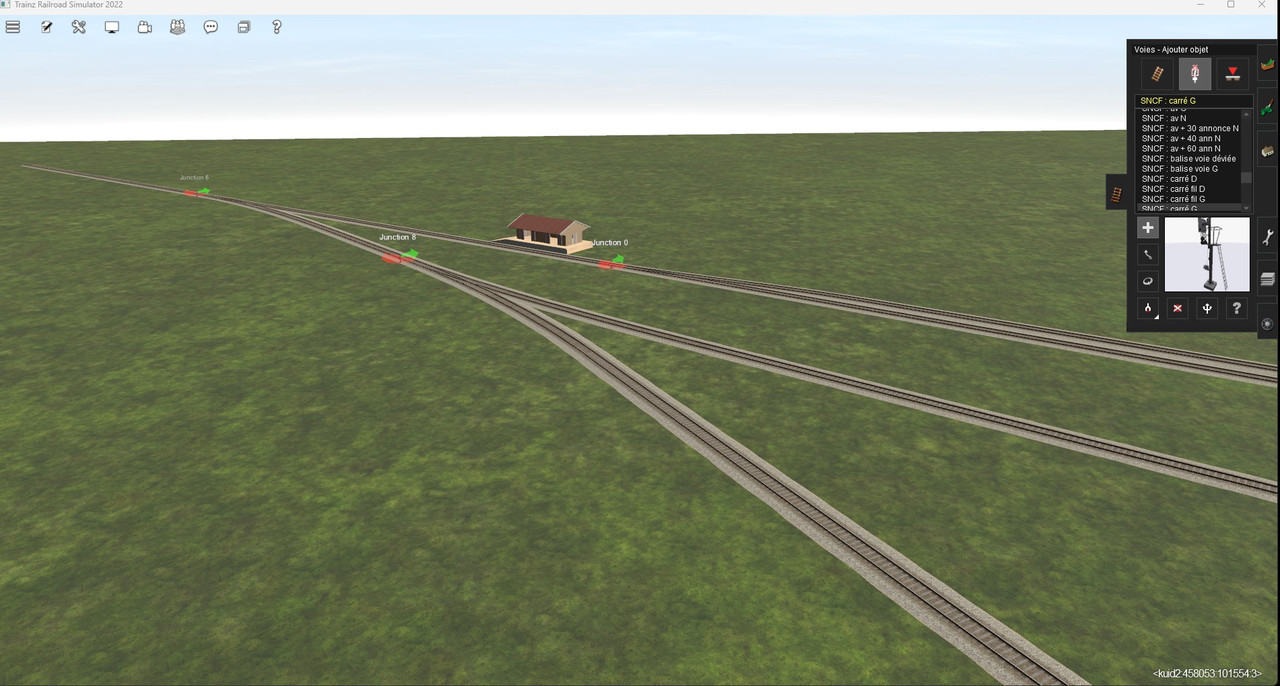
I tried this method but it still doesn’t work Entering the route show again display the system indicates "Spline Incompatible"The Update Announcement Thread (at https://forums.auran.com/threads/trainz-update-announcement-sp5.179952/) is full of messages about this "bug" in the update. There is a simple solution provided by one user @JCitron
1. Close Trainz.
2. Go into Content Manager.
3. Search for your tracks using category track.
4. Open up all your track for editing -
(Select all - click on one and press CTRL+A and then Right-click and choose Open for editing)
5. Submit all DLS track OR
6. Revert to original all built-in and DLC track.
open all my tracks and Submit solved the problem thanks for youThe Update Announcement Thread (at https://forums.auran.com/threads/trainz-update-announcement-sp5.179952/) is full of messages about this "bug" in the update. There is a simple solution provided by one user @JCitron
1. Close Trainz.
2. Go into Content Manager.
3. Search for your tracks using category track.
4. Open up all your track for editing -
(Select all - click on one and press CTRL+A and then Right-click and choose Open for editing)
5. Submit all DLS track OR
6. Revert to original all built-in and DLC track.
SRY I tried it again and found that only some tracks can fix this bug. The same is true for 4.6 tracks. Some of them can be fixed, but some can't. They were all installed by myself if they could not be placed.The Update Announcement Thread (at https://forums.auran.com/threads/trainz-update-announcement-sp5.179952/) is full of messages about this "bug" in the update. There is a simple solution provided by one user @JCitron
1. Close Trainz.
2. Go into Content Manager.
3. Search for your tracks using category track.
4. Open up all your track for editing -
(Select all - click on one and press CTRL+A and then Right-click and choose Open for editing)
5. Submit all DLS track OR
6. Revert to original all built-in and DLC track.
I can't even get airport 43 line to to accept a signalHello
Since the last update, (Trainz 22 PE) I can no longer place signals or track accessories on the rails, the system indicates "Spline Incompatible" what setting should be made? Many thanks in advance !!!!
Kind regards
André
I can Drop a consist on the track but signal no goI got the angle plate bridge 2 T to accept a signal ill keep working on it, just drag and drop to main route line
See the post above your first one. The fix is the same since the airport uses "track".I can't even get airport 43 line to to accept a signal