
Question About Saving Sessions

RepublicDC9

New member
Really silly question about saving sessions in process - when I have to break from the action but want to save my progress on the route, switching moves completed so far, etc. it prompts me to save as the existing session or enter a new name to save.

But even if I title it "2/22/26" or whatever, I somehow end up with a bunch of sessions strung out left to right - and if I end up trying to delete one that I think is no longer needed - POOF! they all disappear.

I do know how to export as a .cdp so I do that on occasion when I've really added a lot of rolling stock, trains, etc. just to be safe.

But how do I do the equivalent as a "save as" in say a Word document or Excel sheet without adding a bunch of extra copies, strange timestamps, etc?

Thanks!
 
I somehow end up with a bunch of sessions strung out left to right - and if I end up trying to delete one that I think is no longer needed - POOF! they all disappear.
From that description it seems that you are saving "Driver Games" or "Driver Sessions" that save the current state of play in a running session. This feature is only available in TRS19PE, TRS22 and Trainz Plus, as far as I know as these versions come with the UDS. This will save the current position and features (speed, product loads, driver orders in the queue, etc) of all consists, the time of day, weather conditions, signal and switch states, industry settings (products, load levels) and the state of each and every session rule (completed, was-completed, does-complete, running).

When you save during the running of a session without entering a name the "Driver Game" or "Driver Session" will default to using the same name as the session that it is based on with the date, time and run duration added to the end of the name. Each time you save, again without entering a name, the date, time and run duration will be increased (usually only the run time will change unless you save before and after midnight) and you will have a new copy of the "Driver Game". Each save will produce a new copy. This can be useful if you want time-stamped versions of the changes during the running of a session as an aid to debugging a problem.

Hence the "bunch of sessions" that you see.

If you enter a set name for the session save (e.g. Test Run from Start) and you do not want time-stamped versions at different stages of the session, then select the same name each time you save. You will get a warning about the save overwriting or replacing the original - ignore the warning.

As for the "POOF! they all disappear". This will happen if you delete the original session, the one you loaded into Surveyor and then selected Drive Session from the Tools menu. Since this session is the "Mother" of all the "Driver Games" you had saved, then they are deleted as well. The "Driver Games" can only be loaded in and played if the original session they were saved from is still present. Its like deleting Word from your system and then expecting to be able to load in a Word document for editing.

In Content Manager, saved "Driver Games" or "Session Games" are shown with the status label "Misc".

There is a Wiki page that deals with all these matters. The relevant section is at Route_and_Session_Basics#Saving_and_Loading_Games_in_Driver
 
Last edited:
pware, a question regarding the default session. Why would the default session affect driver saved sessions? I thought driver saved sessions were independent from the default session. If you delete an earlier driver session, then all sessions after it will also be deleted. Driver saved sessions rely on the earlier driver saved session not the default.
 
Why would the default session affect driver saved sessions?
Perhaps some confusion over the word "default" here?

When you run a session in Driver and, while it is running, you select Save then you will be saving a "Driver Game" or "Session Game" (the exact term eludes me) that will be based on the session that you started in Driver. One way of looking at it is that the "Driver Game" is a child of the loaded session or that the loaded session is the parent ("mother") of the saved "Driver Game". Unless you enter a name for your "Driver Game" then its saved name will default to using the same name as its parent session but with date, time and runtime added to the end of the name.

If you load a different session into Driver, then any saved "Driver Games" will be children of that session and, unless you add a name when saving, they will use the same name as parent session with date and time data added.

If you delete a "Driver Game" then it will only delete that saved game, not the parent session or route it is based on.

If you delete a parent session then it will delete ALL its saved child "Driver Games", but not the child "Driver Games" of any other session. If you delete a route then it will also delete all the sessions created using that route (and all their child "Driver Games" if you have any saved). One thing that I would like to see is a method of identifying which "Driver Games" belong to which sessions.
 
But how do I do the equivalent as a "save as" in say a Word document or Excel sheet without adding a bunch of extra copies, strange timestamps, etc?
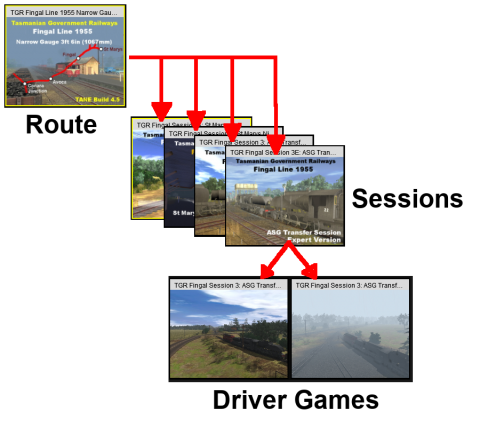
Perhaps this diagram may help clear things.

480px-RouteSessionGamesMap.png
Routes:
You can have as many Routes in Trainz as you can fit into your available storage devices. Routes are saved from Surveyor.

Sessions:
Each Route can have one or many separate Sessions. Sessions, like Routes, are also saved from Surveyor. Each Session belongs to a particular Route.

Technically you can have a Route without any Sessions but each time you load the Route into Surveyor or into Driver, all its settings (time of day, season, weather, industry products, rolling stock commodities, etc) will be reset to their default values and there will be no session rules and no driver commands.

Driver Games:
Each Session can have none, one or many Driver Games. Unlike Routes and Sessions, Driver Games are saved while a Session is running in Driver.

So, if you save from Surveyor, you are saving the Route or the Session (or both). If you save from Driver, you are saving a Driver Game which, if you do not enter a specific name, will be saved with the name of its parent Session with a date/time stamp.
 
Back
Top