'19 TO '22 ADVICE

rick1958

Well-known member
I'm getting ready to begin using a new (to me) PC that currently has '19 installed (my install).
Do I need to, or should I, uninstall '19 before installing '22 or doesn't it matter?
I guess I should also ask is there a newer version in the works that I might want to wait for?
 
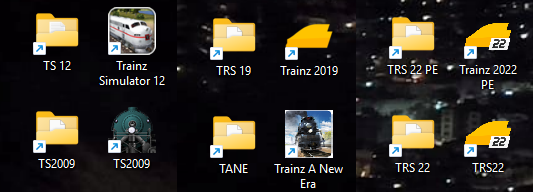
I have TS2009, TRS12, TANE, TRS19, TRS22, and TRS22PE all installed and in use ... two are Steam versions and the others are standard.
Each one is installed in its own folder, and I even move assets between them.
trs-vesiones.png
 
Last edited:
I have TS2009, TRS12, TANE, TRS19, TRS22, and TRS22PE all installed and in use ... two are Steam versions and the others are standard.
Each one is installed in its own folder, and I even move assets between them.
trs-vesiones.png
Thanks... I guess that pretty much answers that question. The only other thing I'm curious about is, will I end up with a bunch of faulty assets when I reinstall my '19 content into '22? I'm just trying to prevent regrets before I make them.
 
Thanks... I guess that pretty much answers that question. The only other thing I'm curious about is, will I end up with a bunch of faulty assets when I reinstall my '19 content into '22? I'm just trying to prevent regrets before I make them.
Here is an answer for you to think about: First lets set one thing straight, like any other Operating Sys, Windows, Apple, Linux all have issues with applications not working or not programmed correctly, with Trainz, I started with Trainz Driver 2 for Ipad. This was 2014, from that time on, I had some Faulty Assets to deal with, in my case because I'm not and never will be a Asset Creator, the Choice, find some one to fix said Asset, or Delete it and replace or work with out. As Trainz evolved, my Faulty Assets increased exponentially.

Why, well for one good reason, new Trainz Versions, more restrictions with how Assets were made, LOD, Level of Detail load against the Trainz Program. So what worked on more than one version of Trainz eventually Versioned out, and would not be supported unless the Auther of said Asset, redid, fixed, upgraded an older Asset to work with newer versions of Trainz. Be warned, it is a lot of work to go thru an older Asset and fix, recreate etc.

Not every Author is going to do this, and this is very time consuming issue! Let alone, many Authors have passed away too .RIP

A fair number of us run 2 or more versions of Trainz, and fairly well know, which older Assets work with which Trainz Version.

For me, I love TRAINS 2019 Platinum and I really like Trainz 2022 PE (Platinum) I know exactly which Routes will work in either Trainz, just last week, I had a huge Merged Route with missing Tracks I couldn't located on 1/4 the Route, my missing Spline would not work in 2022, however in 2019 it worked quit well. End result, I use 2019 and not put up the hassle of 2022 issue with missing spline utility.

But to be fair with 2022, 2022 surpasses 2019 in many ways, it's faster on DBR by 50% or more, you can do a whole lot more with

TRS22 / TRS22PE or Trainz Railroad Simulator 2022 / Platinum Edition, is the latest version of the very popular simulation game, Trainz by N3V Games. Pre-orders for TRS22 commenced on December 9, 2021 and coincided with a TrainzPlus Beta upgrade on December 21, 2021, which included Surveyor 2.0, a completely revamped interface for creating, building, and operating Trainz Routes. TRS22 Platinum Edition released on August 22, 2023.

On February 11, 2022, Tony Hilliam announced the release of TRS22 "Early Access Edition" in anticipation of a late-March 2022 official release of TRS2022. As external testing continued, extra time was taken to ensure a smooth official release which took place on May 31, 2022.

However with all the great features of 2022, you still have to deal with Older Assets that show Faulty, and or do not comply with Rules of Asset Creation, and it is a laundry list on what your Asset how your Asset Created.

Currently I have both programs 2019 and 2022 both Platinum, working on 4 Terabyte Drive, Drive Space is another strong, by all means more important to have enough potential room to grow you Version of Trains, with all the 100,000s of Assets you'll collect over time. My asset count at the moment, 780,000, also realize a huge Route can easily reach 1 Terabyte, not counting whatever Assets you'll add, Rolling Stock, Buildings Etc.

Now I must be truthfull every so often, I get a Route, Old or Newer, that simply will not work properly in either Version of Trainz, if I can get it working within an hour, I get rid of the Route. I have plenty of others.

As an initial advice, make sure you purchase the largest SSD, beefy Video Card you can find, most RAM for memory, I run 64 GB, 8GB Radeon, AMD Rysen (runs much cooler than Intel)

Device name ROG STRIX
Processor AMD Ryzen 9 8940HX with Radeon Graphics (2.40 GHz)
Installed RAM 64.0 GB (63.2 GB usable)
Device ID 53040EAE-78F6-4D1C-BACD-6D140CAA6620
Product ID 00342-21454-40214-AAOEM
System type 64-bit operating system, x64-based processor
Pen and touch No pen or touch input is available for this display

I hope this helps, and there are other much more learned Members here than me.

 
There's no need to uninstall TRS19.

You can keep your existing TRS19 install and use that for testing, and as always back that up to an external hard disk so you don't lose your data.

Your TRS19 database can also be "ported over" to TRS22 by copying the data-folder to another location and pointing your TRS22 install to it. When the TRS22 Launcher connects to the old TRS19 database, your existing login information will be there and the program will want to restart.

After it restarts, it'll run a database repair. This can take some time depending upon how much content you have installed.

You may have to download content updates, and may have some faulty content. The faulty content ususally clears up by viewing errors and warnings and by updating the content. Check your DLC packages in the Content Store and on the DLS for updates.
 
Here is an answer for you to think about: First lets set one thing straight, like any other Operating Sys, Windows, Apple, Linux all have issues with applications not working or not programmed correctly, with Trainz, I started with Trainz Driver 2 for Ipad. This was 2014, from that time on, I had some Faulty Assets to deal with, in my case because I'm not and never will be a Asset Creator, the Choice, find some one to fix said Asset, or Delete it and replace or work with out. As Trainz evolved, my Faulty Assets increased exponentially.

Why, well for one good reason, new Trainz Versions, more restrictions with how Assets were made, LOD, Level of Detail load against the Trainz Program. So what worked on more than one version of Trainz eventually Versioned out, and would not be supported unless the Auther of said Asset, redid, fixed, upgraded an older Asset to work with newer versions of Trainz. Be warned, it is a lot of work to go thru an older Asset and fix, recreate etc.

Not every Author is going to do this, and this is very time consuming issue! Let alone, many Authors have passed away too .RIP

A fair number of us run 2 or more versions of Trainz, and fairly well know, which older Assets work with which Trainz Version.

For me, I love TRAINS 2019 Platinum and I really like Trainz 2022 PE (Platinum) I know exactly which Routes will work in either Trainz, just last week, I had a huge Merged Route with missing Tracks I couldn't located on 1/4 the Route, my missing Spline would not work in 2022, however in 2019 it worked quit well. End result, I use 2019 and not put up the hassle of 2022 issue with missing spline utility.

But to be fair with 2022, 2022 surpasses 2019 in many ways, it's faster on DBR by 50% or more, you can do a whole lot more with

TRS22 / TRS22PE or Trainz Railroad Simulator 2022 / Platinum Edition, is the latest version of the very popular simulation game, Trainz by N3V Games. Pre-orders for TRS22 commenced on December 9, 2021 and coincided with a TrainzPlus Beta upgrade on December 21, 2021, which included Surveyor 2.0, a completely revamped interface for creating, building, and operating Trainz Routes. TRS22 Platinum Edition released on August 22, 2023.

On February 11, 2022, Tony Hilliam announced the release of TRS22 "Early Access Edition" in anticipation of a late-March 2022 official release of TRS2022. As external testing continued, extra time was taken to ensure a smooth official release which took place on May 31, 2022.

However with all the great features of 2022, you still have to deal with Older Assets that show Faulty, and or do not comply with Rules of Asset Creation, and it is a laundry list on what your Asset how your Asset Created.

Currently I have both programs 2019 and 2022 both Platinum, working on 4 Terabyte Drive, Drive Space is another strong, by all means more important to have enough potential room to grow you Version of Trains, with all the 100,000s of Assets you'll collect over time. My asset count at the moment, 780,000, also realize a huge Route can easily reach 1 Terabyte, not counting whatever Assets you'll add, Rolling Stock, Buildings Etc.

Now I must be truthfull every so often, I get a Route, Old or Newer, that simply will not work properly in either Version of Trainz, if I can get it working within an hour, I get rid of the Route. I have plenty of others.

As an initial advice, make sure you purchase the largest SSD, beefy Video Card you can find, most RAM for memory, I run 64 GB, 8GB Radeon, AMD Rysen (runs much cooler than Intel)

Device name ROG STRIX
Processor AMD Ryzen 9 8940HX with Radeon Graphics (2.40 GHz)
Installed RAM 64.0 GB (63.2 GB usable)
Device ID 53040EAE-78F6-4D1C-BACD-6D140CAA6620
Product ID 00342-21454-40214-AAOEM
System type 64-bit operating system, x64-based processor
Pen and touch No pen or touch input is available for this display

I hope this helps, and there are other much more learned Members here than me.
Thanks for that lenghty reply. Much to think about for sure. For now, I think I'll forgo the headaches and stay with'19. I have no idea how long until I need to move up, but for now, let the sleeping dogs lie
 
There's no need to uninstall TRS19.

You can keep your existing TRS19 install and use that for testing, and as always back that up to an external hard disk so you don't lose your data.

Your TRS19 database can also be "ported over" to TRS22 by copying the data-folder to another location and pointing your TRS22 install to it. When the TRS22 Launcher connects to the old TRS19 database, your existing login information will be there and the program will want to restart.

After it restarts, it'll run a database repair. This can take some time depending upon how much content you have installed.

You may have to download content updates, and may have some faulty content. The faulty content ususally clears up by viewing errors and warnings and by updating the content. Check your DLC packages in the Content Store and on the DLS for updates.
Thanks John. I have enough going on right now within creating something else to keep me up at night. (blue odessey's post above) I didn't want to move all my stuff to a new '19 install if it would just have to be deleted down the road, but if I can keep it and install 22 later. I'll go that route. I'm happy with '19 for now
 
Back
Top