Textures / Rails tearing and shadows

N5VAV

TPR Route Creator
Hello All.
I've been doing TRAINZ for a long time, and this is a recent problem with a new computer.
I notice in TRAINZ 19 and 22 that along some rails and roads, there are textures "bleeding" into them, and showing dark shadow edges.
I also find that different textures seem to raise or lower the terrain under them, causing textures across roads, rails, and again causing dark shadow edges along the track and roads. It really doesn't look very good.
On my previous computer, I did not notice any of these things, and it all looked great in both 19 and 22.
I'm concerned now about the looks of the routes and that they aren't looking very nice.
Is this something with the video card, or a setting somewhere I can fix? I HAVE tried various settings, and only by turning off all shadows does the shadow effect go away on the track and road edges.
I have not found anything to keep the textures from raising and lowering the terrain. It seems to be especially prevalent with PBR textures, and almost being able to see through them.
Any help will be appreciated, as I'm not at all happy with the look of the routes now. :(
Thank you all !
 
I would say with almost 100% certainty that the effects you are seeing are, as you mentioned, due to using PBR textures. PBR textures have a height component, hence they "seem to raise or lower the terrain under them". Please note that this is an "issue" in all games and sims that use PBR ground textures and is not unique to Trainz.

There is a section of the Trainz Wiki page on using Surveyor 2.0 that covers this issue and some suggestions on how to deal with it. See How_to_Use_S20_Tools_Using_PBR_Textures.

Personally, I much prefer PBR textures to the older "flat" textures and now use them everywhere throughout my routes. The issues you described and are covered in the Wiki link are minor inconveniences (in my opinion) and can be adequately dealt with.
 
Last edited:
If you set your shader setting to Basic, this will remove the 3d-effect of the PBR textures. This also increases the performance as well since there's less work for the video card to process.
 
Please note that this is an "issue" in all games and sims that use PBR ground textures and is not unique to Trainz.

Ubisoft have been using PBR ground textures in their games since at least 2017. I have never seen any of the parallax mapping height problems that I see in Trainz.
 
Last edited:
Ubisoft have been using PBR ground textures in their games since at least 2017.

Ubisoft have developed a proprietary system for dealing with PBR ground textures called CHORD (CHain Of Rendering for Decomposition of PBR) that probably explains the differences you see. The latest experimental iteration of CHORD uses AI to generate the PBR basemaps.
 
Thank you all for the replies!!! OK, I'll play with the settings tonight and try the BASIC shading JCitron suggests and see what PWare suggests as well.
Even if I do that for MY system, what about other users out there that will be running on my routes? I would hate to think that all the time and effort spent on making the route look great
is lost due to the PBR effect on splines. :( If I fix the problem for me, it doesn't really fix it for others that use the route.

What are route developers doing about that? Perhaps not using PBR textures under the track and roads?
I just would like my routes and things that TPR does to continue to look and perform great for the users of our routes.

What would you, Dinorius, JCitron, Pware, recommend as far as using PBR textures around track and nearby roads?
Thank you.
 
What would you, Dinorius, JCitron, Pware, recommend as far as using PBR textures around track and nearby roads?
I have switched to using PBR everywhere throughout my routes, including under roads and tracks. In those places (very few compared to the size of my routes) where these issues appear, I have used the techniques identified in the Wiki at How_to_Use_S20_Tools_Using_PBR_Textures to eliminate all the road and track overlap issues and the majority of the height issues (where there is a sudden change in the terrain height). But you can never eliminate them all. My trade-off is that the PBR textures look far, far better than the old "flat" textures.

You have no control over the display and other performance settings used by those who install your routes. There will be many users who are running Trainz on minimal or low-end machines and have no choice other than reducing their performance settings to low levels. There will be others who can "max out" their settings for most routes with no ill effects. But the optimal settings are not just hardware related, they will also depend on the route loaded into Driver. Some routes that use GPU intensive features such as many effect layers and lots of high poly assets can slow down even a high performance machine.

You also have the fact that TurfFX effect layers will only appear on machines with NVidia GTX (or better) GPUs. So do you not use TurfFX? I use TurfFX but I make sure that the texture beneath that effect layer can be a suitable substitute - for example: under a wheat crop TurfFX layer I use a ground texture that looks like a plowed field.

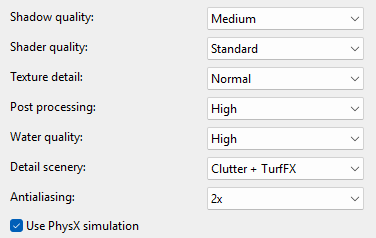
I include in my route descriptions the statement "Uses Plant Factory trees, procedural track, effect layers, PBR textures and areas of high detail." so users can make up their own minds. My Performance settings are:-

Screenshot_2025_12_30_172807.png
 
Last edited:
I have switched to using PBR everywhere throughout my routes, including under roads and tracks. In those places (very few compared to the size of my routes) where these issues appear, I have used the techniques identified in the Wiki at How_to_Use_S20_Tools_Using_PBR_Textures to eliminate all the road and track overlap issues and the majority of the height issues (where there is a sudden change in the terrain height). But you can never eliminate them all. My trade-off is that the PBR textures look far, far better than the old "flat" textures.

You have no control over the display and other performance settings used by those who install your routes. There will be many users who are running Trainz on minimal or low-end machines and have no choice other than reducing their performance settings to low levels. There will be others who can "max out" their settings for most routes with no ill effects. But the optimal settings are not just hardware related, they will also depend on the route loaded into Driver. Some routes that use GPU intensive features such as many effect layers and lots of high poly assets can slow down even a high performance machine.

You also have the fact that TurfFX effect layers will only appear on machines with NVidia GTX (or better) GPUs. So do you not use TurfFX? I use TurfFX but I make sure that the texture beneath that effect layer can be a suitable substitute - for example: under a wheat crop TurfFX layer I use a ground texture that looks like a plowed field.

I include in my route descriptions the statement "Uses Plant Factory trees, procedural track, effect layers, PBR textures and areas of high detail." so users can make up their own minds. My Performance settings are:-

Screenshot_2025_12_30_172807.png
Thank you for your thoughts. I currently have a gaming computer and most of my settings are high or ultra. Still getting good performance, although I do this to see when performance becomes an issue to me and reduce the polys, splines, etc. in an area so that folks with "normal" computers can still run the route with decent results. I will turn down my Shader quality for sure and see how that helps, at least for me.
I'm going to try your settings and see what happens, it should be pretty smooth on my machine.
Ok on the PBR techniques website. I will try some of those techniques when I'm using PBRs under track and roads, as that is where the issues arise for me. I'll use the PBRs normally out away from the splines.
Personally, I haven't added any TurfFX to my routes, the reason being is that is a tremendous performance hit for me, even with my machine, so I know it would be for others with a "normal" computer. I do like the animated effects of the grass, etc. but I just haven't convinced myself that it is worth the significant performance hit i suffer. That Kickstarter route is very choppy on my computer, but I know the TurfFX extends WAY out from the track, so that may be an issue. When I turn off the FX for that route, the route is smooth as glass.
I know I can't control (unfortunately) the end user's settings, but I hope they can learn, as I am, how to fix any issues they may have. All I can try to do for my end users is try to texture and place things so that the route looks as good as possible for them.
I'm thinking if I can make it look good on my machine, it should be good on theirs.
Thank you all for the responses. I will forge ahead and develop routes that look as good as I can get them.
 
That Kickstarter route is very choppy on my computer, but I know the TurfFX extends WAY out from the track, so that may be an issue.
There were a few routes released when TurfFX first appeared where the creators had gone overboard and painted the effect layer way out to the edge of all baseboards where their animation and other effects could not possibly be seen. I limit TurfFX and Clutter to the immediate track area (e.g. TurfFX grasses, Clutter small stones and plants, to under and alongside the track) or TurfFX crops (e.g. wheat) to within a few 100m of the track.

When I was experimenting with the Water Effect Layers on a very large route, I added a second Water Effect Layer with different surface colour and roughness effects to add some variety to the waterways, creeks and small dams. The extra layer added 40MB to the route size (which was about 10%) so I decided to stick with just one Water Effect Layer.
 
Last edited:
Back
Top