Navigation Icons Don't Always Appear

skittlekicks

Active member
As I have been laying out the key navigation points for my session, I've noticed that the icons don't always appear until you are nearly on top of them. In other cases not at all. I'm not sure if this is due to how the indentation is for the ordered list and it's children, if it's a bug in the version I am in (132316), or is this a distance setting issue for the route (my route is defaulted to 11500 as are the icons). In other sessions rules I have looked at what I am doing seems to be correct. Clearly I must be missing something.

I do use the traditional triggers (not trackmarks). and typically they are set to trigger once. That still doesn't explain why when they do activate I am nearly on top of them.:unsure:
 
"Appear" or "Activate" when you are nearly on top of them? It is a bit unclear as to which you mean.

Both Triggers and Trackmarks have an effect radius that controls how close a consist (usually the lead loco unless the consist is reversing) has to approach the object to activate it (in the case of a Trigger) or complete its operation (in the case of a Trackmark - e.g. "Drive To").

Changing this effect radius to a smaller value means the consist has to approach closer.

The Effect Radius and how to change it is explained in the Trainz Wiki at:-

Set_the_Track_Mark_Effect_Radius (Surveyor Classic)
Set_the Track Mark_Effect_Radius (Surveyor S20)

Set_the_Trigger_Effect_Radius (Surveyor Classic)
Set_the_Trigger_Effect_Radius (Surveyor S20)

If, for some reason, you mean that they do not "appear" until you are almost on top of them, then they should never appear as visible objects in Driver, only in Surveyor. If they are not appearing in Surveyor, then that is something I have never experienced.
 
placing the nav icon above a trigger
A confusing description. Navigation icons are attached to objects using the Navigation Display Rule. But I am happy that you now have it working.

Other options to explore with Nav Icons are how they are terminated. Most people simply leave the Style setting at Automatic but the other options - Require Stop and Manual - can be very useful.
 
All I mean is the icon for the navigation display must be placed above the trigger check icon. What I wish we had was some type of preview window for visual representation. You can't see what results you are getting until you go into driver. Now I get why it can take hours and hours of testing sessions. It's a very grindy process.
 
Something I have noticed in that navigation point rule page is the trigger is not in an ordered list nor is it indented. The children rules are. I wonder now if that makes a difference in the behavior?

My order is:

List
Navigation Display
Trigger Check
Set Junctions
Message Popup

This is the only way the navigation display appears for me.
 
All children rules are indented by one inside the List

A problem that you have, as I see it, is that all the Navigation Display rules are executed as part of an Ordered List rule. Note the wording in the Navigation Display rule "and waits for it to be completed". That means that the Ordered list will not progress to the next rule, the Trigger Check rule in your first screenshot, until the Navigation Set rule above it has been completed (i.e. all its nav icons have been cleared).

Incidently, you don't need both a Navigation Point and a Trigger, in the sense that the nav point is attached to the trigger, as the Nav point will execute its rules as soon as it is reached - unless of course you want the Trigger to execute its own set of rules independent of the Nav Point.

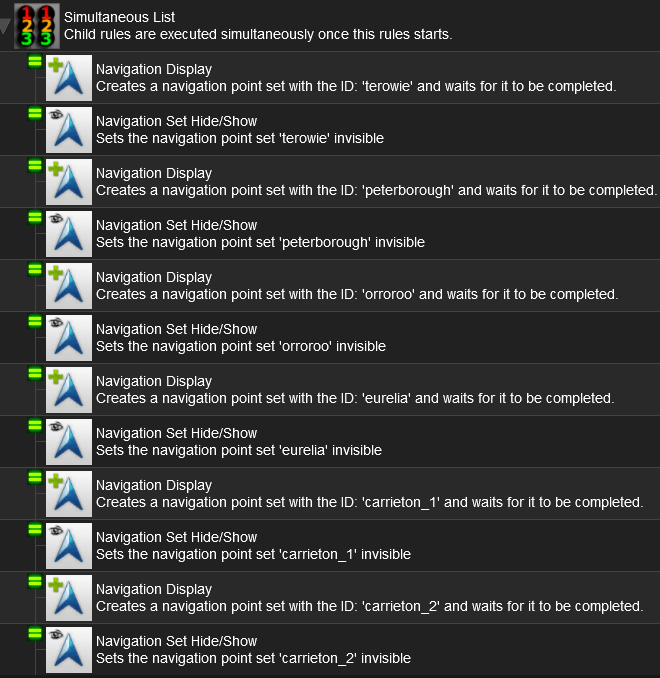
My method, one of many possible techniques, is to use a single Simultaneous List Rule to create and then hide all the Navigation Displays in one operation.

Nav_Display_Rules.png


Each indented rule is executed simultaneously so all the Navigation Points used throughout the session are instantly created and instantly hidden (the Navigation Set Hide/Show rule does that). No waiting for any rule to be completed before the next rule is executed. They will be revealed (by the same Hide/Show rule set to Show) when needed.

All the Navigation Display rules will still remain active, waiting for each of their nav points to be cleared, while the session is running.

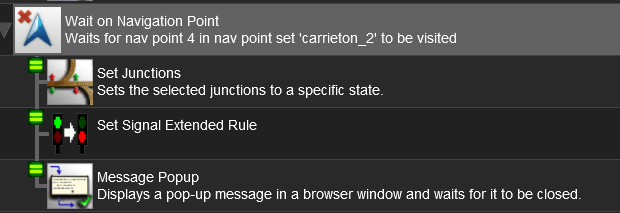
After a Navigation Point set has been revealed then I use the Wait on Navigation Point rule (for a nav point attached, for example, to a Trackmark) to perform the required actions.

Wait_on_Nav_Rule.png


In this example they are all simultaneous so they are all executed at the same time. If I wanted them to be executed in a set sequence, and wait for each rule to be completed before the next is executed, then I would add an Ordered List rule as the first indented rule under the Wait on Navigation Point rule. I would then add the additional rules indented again under the Ordered List rule.

It is a learning curve and, effectively, it is a programming language that has to be mastered.

 
Last edited:
Thanks for the insight.

I do need more of the ordered list. In my mind train movements are done one at a time in order. The engineer always waits for permission to continue (even while in motion a driver calls out signals).

That's how I was thinking I was setting it up. As realistic as possible with none of the "arcade" stars, point systems rules, or pausing the game as the popup messages occur (takes away from immersion) that are in the game. As it sits now what I do have is working, but maybe what you showed is more efficient.

One thing I wish I could do is add my own pre recorded voice overs as communication instead of using popup messages to indicate that. Again realism is what I am going for.
 
One thing I wish I could do is add my own pre recorded voice overs as communication instead of using popup messages
In Tume's Milwaukee Road Avery to Drexel he somehow included voice in his sessions. I'm guessing the script for the session calls sound files at points where he says things. At the beginning of the session there is a crew change coming up, and once that happens he says "Crew change complete, go on, get out of here!" 🤠
 
That's pretty epic. I read there is a way to call an audio file, but I'm no programmer. I'm still sorting out the navigation rules. I messed up so now I have to rework everything. I hate when I break something that was working.
 
Yeah, since it is payware, the script may be encoded. It would be good if you could look at it for an example.
Considering the cluster f I am dealing with the session rules after I completely f'd everything up, I'm not gonna mess with anything related to adding audio. I am beyond pissed off right now and am actually ready to break stuff. Yes this game does that to me, and at 50 years old this is NOT good.
 
and at 50 years old this is NOT good
Try 74 years old!

Session Rules use a logic that, while consistent, usually does not match human logic - much like reality! It just takes experience and practice.

My philosophy is to use fully guided sessions (with nav points and message popups) to give a user the "road knowledge" for the first few times at least that they try the session.

For my latest project, to be released "real soon now" (which I have been saying for a few years now but it is now looking like in the next few weeks:unsure: hopefully) I have also created a set of wiki pages that gives the user their "Driver Orders" and leaves the execution up to them. Each of the guided sessions (5 created so far) has a direct link to the relevant Driver orders Wiki Page. So once they have mastered the road, they can cut loose and do everything (set switches, drive the train, navigate, etc) themselves.

The Driver Wiki pages can be found at https://online.ts2009.com/mediaWiki/index.php/SAR_Peterborough_Base_Session_V2.

So far I have fully guided sessions prepared for numbers 1, 2, 16, 24 and 25.
 
Yeah I've read that thing so many times, but the stuff is 7 years old and doesn't work for my situation. It's useless for my needs. I'm just giving up at this point I am not cut out for programming this GD crap. It should not be this f'ing hard, but clearly I am just so GD stupid with this crap. All of you experts get it to work because you have decades of playthrough so yeah you are all better than I am. I get it.

Well I don't and do NOT have the patience to learn this anymore. I've NEVER EVER had a game piss me off so much that my BP is over 200 now (yes I just checked). Already had a bad heart attack at 47, and hyper tension will NOT go down even when I sleep. I guess it was a mistake to ever buy Trainz in the first place given how much this stresses me out.
 
Yeah, might be time for a break. It is not worth getting that stressed out over, there are other more relaxing pursuits, and maybe come back after a long cooldown. I don't break things, but if I get fed up with something on a route, that route usually gets deleted. Not worth my time or heath.
 
If you want to fiddle with something, clone it if possible, or create a second TRS22 install that you can fiddle around with and not worry about your working data. You don't even have to download the installer again. You can copy the currently installed program and create an empty database to start with, or copy your current data folder, rename the folder to something else such as TRS22_TEST_DATA.
 
I have several of my own routes that I mess around with, some Small , Medium and Large. The reason being, That if I get annoyed / fed up with a route while route building / session building, I can change to another route. My routes are in constant state of route / session updates. When I think I have finished building and do some Session building, I find out that I need to do more route building to make the session better.

At times when I don't want to do either (route / session building) , Then I do some session running on a route that has been finished.( no more room to make updates, This route I made a decision that it would be a certain size and no bigger. Sometimes I think that you have to do this, otherwise the route would just keep getting bigger.
 
Back
Top