I had no issues with it. Check that Recall hasn't been installed. If it has, disable it.Another Win 11 update today.....let's see what they screw up this time...........

Install the app
How to install the app on iOS
Follow along with the video below to see how to install our site as a web app on your home screen.
Note: This feature may not be available in some browsers.
You are using an out of date browser. It may not display this or other websites correctly.
You should upgrade or use an alternative browser.
You should upgrade or use an alternative browser.
GPU crashing when working on route
- Thread starter hiawathamr
- Start date
hiawathamr
DLC developer for Trainz
Welp, looks like my 2nd computer decided to call it quiets - GPU has died.
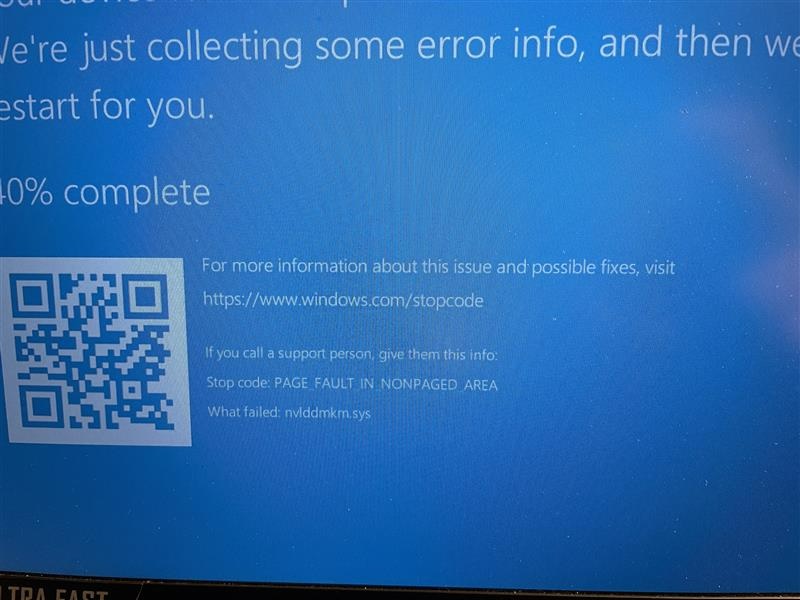
While working on my route, I got greeted with the following screen:
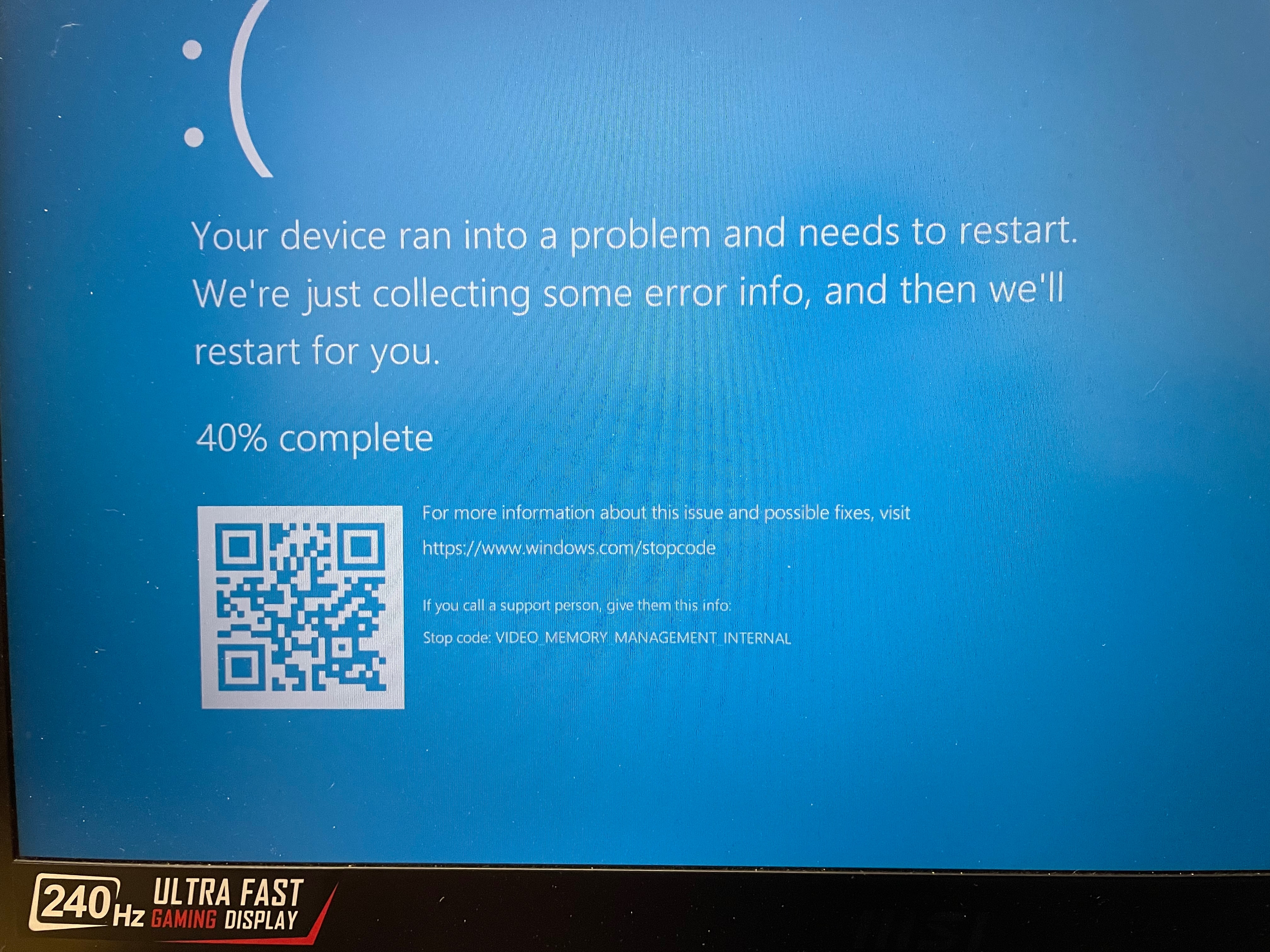
After a reboot, it hanged for about a minute before I was greeted with this screen:
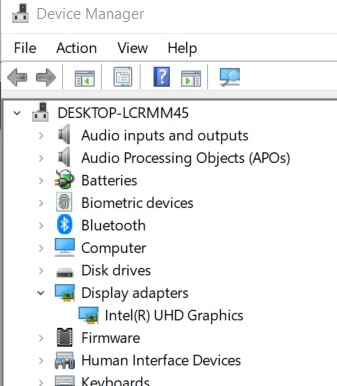
I've decided to check device manager and saw that my GPU is no longer listed
I've also decided to see if the NVIDIA software can detect it and it couldn't so welp. I guess my MSI gaming laptop will be an MSI office laptop until I get a replacement.
Its a shame as it was both a good and nice computer.
I've already been doing a lot of searching on the internet on both fixes, seeing if I can just get a motherboard (as GPU is part of the board itself), etc. Nothing much to report back on.
Anyway - feel free to share some other things that I might've missed but I'm sure I've covered all possible troubleshooting methods out there,
This month has sucked so far with everything.
cheers
While working on my route, I got greeted with the following screen:
After a reboot, it hanged for about a minute before I was greeted with this screen:
I've decided to check device manager and saw that my GPU is no longer listed
I've also decided to see if the NVIDIA software can detect it and it couldn't so welp. I guess my MSI gaming laptop will be an MSI office laptop until I get a replacement.
Its a shame as it was both a good and nice computer.
I've already been doing a lot of searching on the internet on both fixes, seeing if I can just get a motherboard (as GPU is part of the board itself), etc. Nothing much to report back on.
Anyway - feel free to share some other things that I might've missed but I'm sure I've covered all possible troubleshooting methods out there,
This month has sucked so far with everything.
cheers
hiawathamr
DLC developer for Trainz
Normal temperature from what I can tell. Maybe that might be the problem.
I have another laptop that did the same thing back in June of 25 (which was why I reused this thread instead of making a new one).
I did have it lifted up so more air could go into the computer instead of having it completely sitting on the table.
Device manager shows code 45 if that helps.
cheers
I have another laptop that did the same thing back in June of 25 (which was why I reused this thread instead of making a new one).
I did have it lifted up so more air could go into the computer instead of having it completely sitting on the table.
Device manager shows code 45 if that helps.
cheers
Not much to share. Trainz meltz hardware.
Did Afterburner help at all before? The code 45/47 is the sign of a toasted GPU and no matter what you do, it won't appear. Unlike a desktop, you can't plug in a replacement. Well, a desktop would require a 2nd mortgage on your house for a new video card these days.
Did Afterburner help at all before? The code 45/47 is the sign of a toasted GPU and no matter what you do, it won't appear. Unlike a desktop, you can't plug in a replacement. Well, a desktop would require a 2nd mortgage on your house for a new video card these days.
hiawathamr
DLC developer for Trainz
No Afterburner didn't help much on my other laptop - eventually it just stopped booting as that GPU straight up crashed during the boot cycle.
For this one, it was going strong until today when it just stopped all of a sudden.
Portability is important currently so a desktop won't be much help for me at this time but I can't wait for a desktop to be my main PC.
Well, I guess off to see if I can pick up a similar MSI computer (MSI GS66 Stealth 11UE were my 2 comps).
cheers
For this one, it was going strong until today when it just stopped all of a sudden.
Portability is important currently so a desktop won't be much help for me at this time but I can't wait for a desktop to be my main PC.
Well, I guess off to see if I can pick up a similar MSI computer (MSI GS66 Stealth 11UE were my 2 comps).
cheers
Afterburner is a very effective solution for me ... my 3060 (which should last a long time, it seems) was reaching 78°C (172°F ) in Trainz, and just by lowering the power to 80%, it stays at 70°C (158°F) this summer, with no noticeable performance loss.
At winter, it drops to 65°C compared to 72°C without limit (149°F and 161°F). You could say I don't use air conditioning, it's quite far away from my desk.
At winter, it drops to 65°C compared to 72°C without limit (149°F and 161°F). You could say I don't use air conditioning, it's quite far away from my desk.
Hotspot or GPU?Afterburner is a very effective solution for me ... my 3060 (which should last a long time, it seems) was reaching 78°C (172°F ) in Trainz, and just by lowering the power to 80%, it stays at 70°C (158°F) this summer, with no noticeable performance loss.
At winter, it drops to 65°C compared to 72°C without limit (149°F and 161°F). You could say I don't use air conditioning, it's quite far away from my desk.
Your results are similar to mine with my 3080. I lowered my Power to 75%, also so zero difference in performance doing it, and my temps dropped to the high 60s. During the winter, I see 40s idle and high 50s to high 60s.Afterburner is a very effective solution for me ... my 3060 (which should last a long time, it seems) was reaching 78°C (172°F ) in Trainz, and just by lowering the power to 80%, it stays at 70°C (158°F) this summer, with no noticeable performance loss.
At winter, it drops to 65°C compared to 72°C without limit (149°F and 161°F). You could say I don't use air conditioning, it's quite far away from my desk.
Setting up a fan speed curve helped a lot with this. I run the fans quite fast on the higher temps and curve the speed lower on the lower temperatures.
It takes a bit of fiddling and tweaking to get the temperature - fan settings to work.
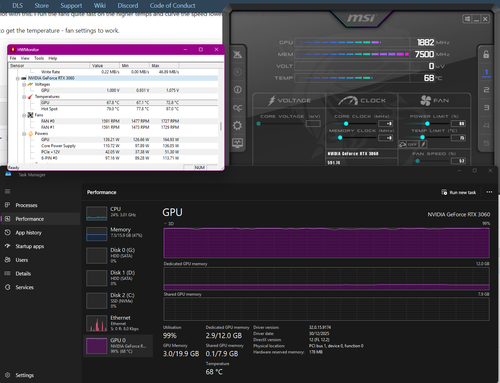
Information displayed by Afterburner (as well as Windows Task Manager), including voltages, fan RPM, and memory frequency and usage. Additionally, the On Display option offers more configurable parameters.Hotspot or GPU?
The Hot Spot and much more could be monitored with Hardware Monitor (CPUID).
Right now, without monitoring, I have 73°C on the GPU and 84°C in the Hot Spot.
With Afterburner enabled, limited to 80%, they drop to 67°C and 78°C respectively in 9 seconds.
Ambient temp 25°C, for reference.
hiawathamr
DLC developer for Trainz
I've talked with my friend yesterday and he said try giving DDU a try which I did in safe mode. After performing that, I've booted into Windows normal and made an attempt to install the GPU driver. The installer won't proceed as it can't detect the GPU. :/
I can take the computer apart and see if there is anything I can do to fix it but at the same time, I don't want to as it boots using the integrated GPU so I can at least do light tasks such as web browsing and word processing. It just can't do any gaming on it such as Trainz.
cheers
I can take the computer apart and see if there is anything I can do to fix it but at the same time, I don't want to as it boots using the integrated GPU so I can at least do light tasks such as web browsing and word processing. It just can't do any gaming on it such as Trainz.
cheers
I agree, leave it well enough alone.I've talked with my friend yesterday and he said try giving DDU a try which I did in safe mode. After performing that, I've booted into Windows normal and made an attempt to install the GPU driver. The installer won't proceed as it can't detect the GPU. :/
I can take the computer apart and see if there is anything I can do to fix it but at the same time, I don't want to as it boots using the integrated GPU so I can at least do light tasks such as web browsing and word processing. It just can't do any gaming on it such as Trainz.
cheers
The "video card" in most laptops these days is only the GPU chip surface-mounted to the motherboard and in the end there's nothing you can do if you take apart the laptop except break very small components located along the edges of the motherboard or rip a latched cable that's hidden underneath.
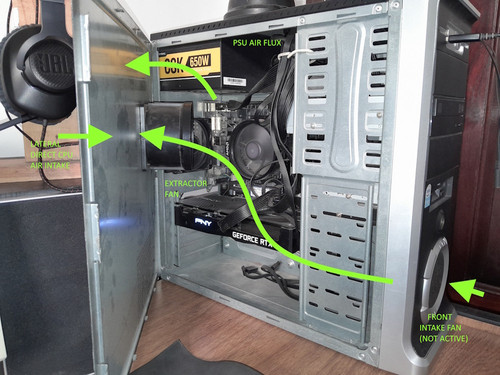
My setup is so simple it's embarrassing ... but it does what I need efficiently. I've been building my own PCs for over 25 years. The case is from 2004, and the newest thing is the RTX card... and it'll have to stay there for a long, long time  .
.
At first, it was just the Ryzen 5600G. Trainz 19 ran decently, but the renders in Blender were slow -it was just annoying- until the 3060 arrived, and you can almost work in real time -if you want, it's not necessary, but it's nice- and Trainz doubled to 70-80 fps.
With this, I get the temperatures I mentioned before ... and I've never felt comfortable with laptops, and I don't think Trainz will either. Sorry, I went on for too long.
.At first, it was just the Ryzen 5600G. Trainz 19 ran decently, but the renders in Blender were slow -it was just annoying- until the 3060 arrived, and you can almost work in real time -if you want, it's not necessary, but it's nice- and Trainz doubled to 70-80 fps.
With this, I get the temperatures I mentioned before ... and I've never felt comfortable with laptops, and I don't think Trainz will either. Sorry, I went on for too long.
hiawathamr
DLC developer for Trainz
Its a shame really, as I like on how nice the computer is - appears to be a basic office computer but under it has powerful hardware to run triple A games and best part is, ot doesn't have that RGB lights (okay except for the keyboard which was turned off ASAP).I agree, leave it well enough alone.
The "video card" in most laptops these days is only the GPU chip surface-mounted to the motherboard and in the end there's nothing you can do if you take apart the laptop except break very small components located along the edges of the motherboard or rip a latched cable that's hidden underneath.
Its small - 358 x 248 x 19.8 mm are the dimensions (WXDXH) so it was portable which is a requirement.
I've been looking at a ton of other MSI, ASUS, and Lenovo comps that are close to those dimensions and I think I found one which is MSI Katana 15 series (both standard and HX).
SSD size doesn't matter as I'll be replacing it with my 4TB m.2 drive anyway.
At the end, I wish I could just buy another MSI GS66 Stealth 11ue computer or at least a replacement motherboard

Thanks for sharing your view.
Don't be embarrased! Simple is betterMy setup is so simple it's embarrassing ... but it does what I need efficiently. I've been building my own PCs for over 25 years. The case is from 2004, and the newest thing is the RTX card... and it'll have to stay there for a long, long time
At first, it was just the Ryzen 5600G. Trainz 19 ran decently, but the renders in Blender were slow -it was just annoying- until the 3060 arrived, and you can almost work in real time -if you want, it's not necessary, but it's nice- and Trainz doubled to 70-80 fps.
With this, I get the temperatures I mentioned before ... and I've never felt comfortable with laptops, and I don't think Trainz will either. Sorry, I went on for too long.
As long as your games runs as expected, do what works.
cheers
Similar threads
- Replies
- 14
- Views
- 2K