
EIT and Level Crossing not reopening after path release

Hi,
I have started using the Enhanced Interlocking Tower and I have configured a path that includes a Level Crossing.

The crossing closes correctly when the path is active.
When the train leaves, the path is definitely released (I can confirm this because the junctions return to their initial position), but the Level Crossing ( PL ) remains closed and never reopens.

Note: The Level Crossing used is a standard type asset (no additional scripts).

Is there a specific setting in the path configuration to force the crossing to open upon release?
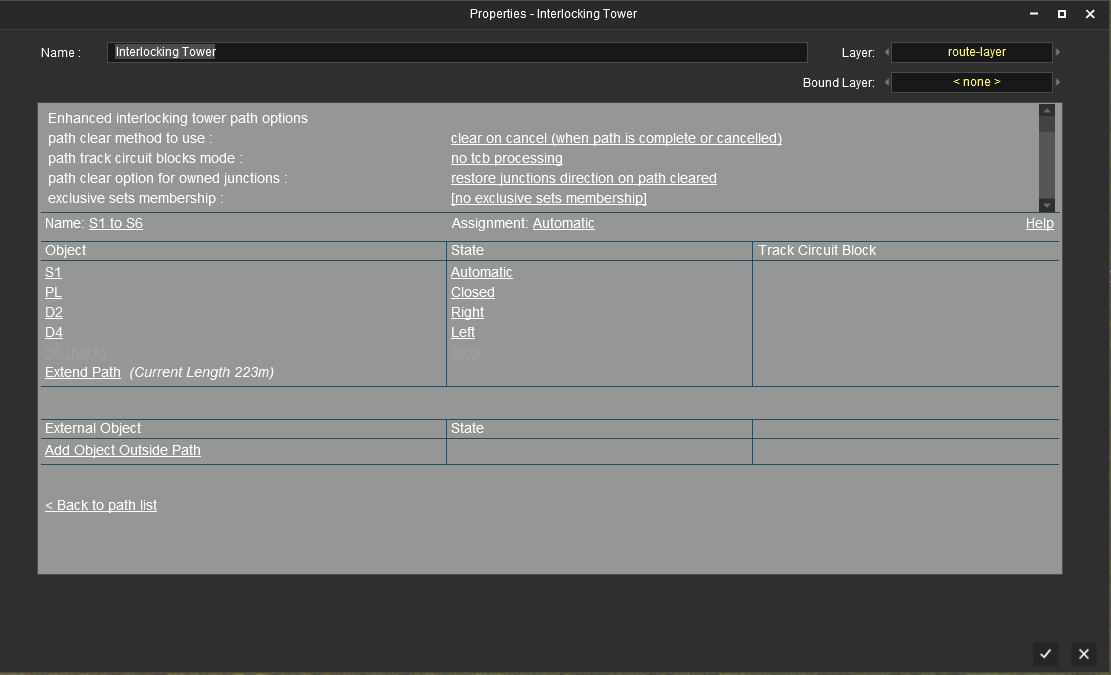
Immagine.png
 
I don't use standard crossings, but looking at your setup, you have it set as closed. Have you clicked on closed to see alternatives?
 
Thanks for the suggestion. I have already tested the alternatives, but they don't solve the logic:

  1. Automatic: The Crossing works as a standalone object (it ignores the EIT protection). It closes only when the train is very close (approx. 200 meters), which is way too late for proper interlocking safety, and then reopens correctly.
  2. Open: The barriers never close.
So, setting it to "Closed" seems the only way to let EIT control the protection in advance, but it seems to miss a "Reset to Open" command when the path is released.
Is this a known limitation for standard crossings?
 
I always set crossings for automatic your alternate choice would be to use ATLS or a TRC set up... (I prefer TRC) for faster trains...
 
After closely analyzing the script, I discovered that the Tower never requests the Lock (permit) for the Crossing. Consequently, when the train has passed and the system checks if the Tower has the rights to reopen it, it finds no lock and the reopening process fails.

Here is the logical flaw preventing the Level Crossing from opening:

  • Activation: The Tower forces the Crossing to close (it does this without checking/requiring the Lock).
  • Transit: The train passes.
  • Unlocking: The "Clear on Drive" function triggers. Before sending the "OPEN" command, it checks: "Do I currently hold the Lock on this object?".
  • The Failure: Since the script explicitly prevented taking the Lock at the beginning, the answer is "NO".
  • Result: The script assumes "It's not mine, I can't touch it" and skips the opening command.
It is very likely that @pguy intentionally disabled this to avoid conflicts with multi-track crossings.

If a single Crossing object spans across multiple tracks controlled by different Paths:

  • With the Lock enabled, Path A would 'steal' the Crossing ownership.
  • If Path B tries to activate simultaneously, it would find the Crossing 'Locked' by Path A, resulting in an error until Path A finishes.
However, for single-track lines (or simple double-track setups), re-enabling this logic is perfectly safe and fixes the reopening bug.
 
Back
Top