Trouble installing 7zip

Forester1

Well-known member
Sorry, this is a software question rather than hardware but wasn't sure where else to post it. Ever since I had to do a system reset, I have been trying to install 7zip. The install seems to go OK, but I no longer get the GUI interface, and I have problems getting it to work at all. I used to have it as a handy menu choice but not any longer. Has anyone else had this issue with 7zip? I am currently on Windows 11 25H2. Thanks for any tips!

 
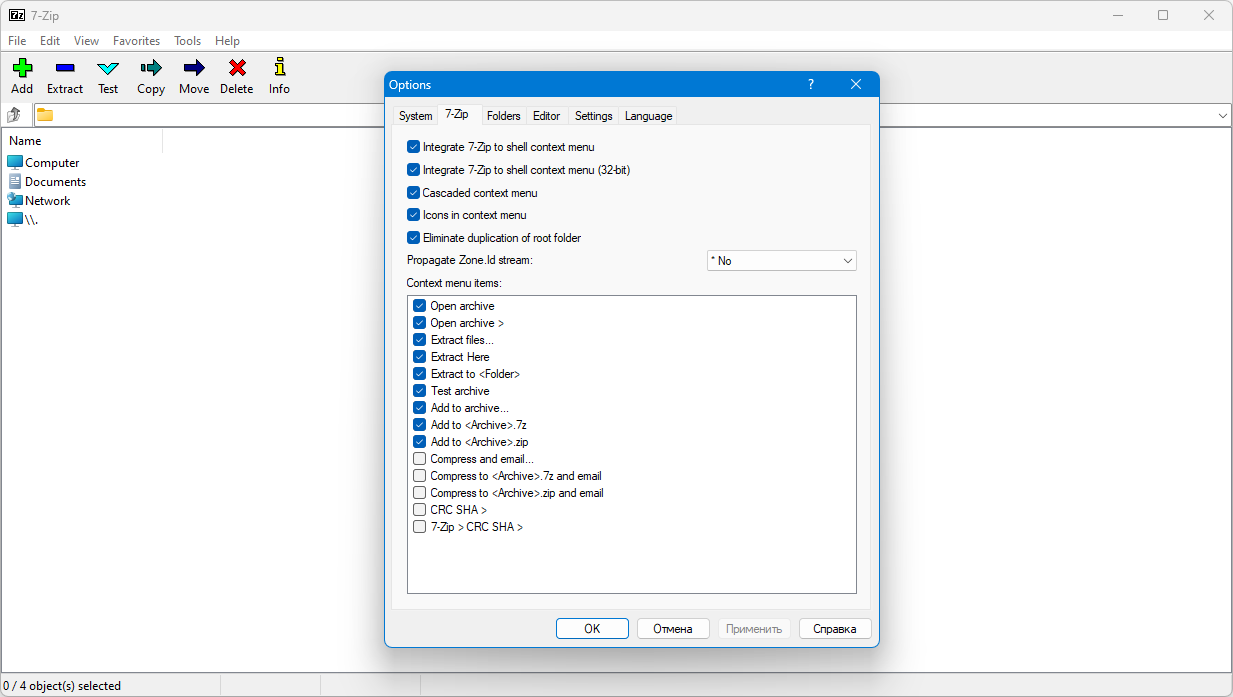
Start button - All applications - 7ZIP, right click (Create a shortcut if necessary) - Launch from the admin. In Tools - Options, set what you need.

 
Last edited:
Thank you @oldman777 , but even running as Administrator (I have to go to C:\Program Files\7-Zip and run 7zFM.exe as administrator) All of these are checked except the first option "Integrate 7-zip to shell context menu" is unchecked and greyed out. No way I can put a check mark there. I suppose I should research if there is a support on their site.
EDIT: I just downloaded and installed the latest release and it now has that first item checked, and shows up in the context menu, although under "show more options". I am not sure why it did not before as the previous version was the 64-bit version (I double checked), but it appears to be OK now.
 
Last edited:
Back
Top