My Trials and Tribulations in Trainz 2019

Smileyman

Socialist Serenade
Rather than flood the forums with all my Ai operational problems and queries, I thought I'd put them in this thread.
The thread on the passenger stations really helped me solve my problems (cheers guys), and will probably help others when they read it.

And that's what I'm hoping with this thread.
Who knows? Maybe the problem I'm about to talk about will be the only problem I ever have with Trainz again!
It could happen! :LOL:

Anyway, this one seems simple but so far it's a doozy.

I have a test where I'm running a 4 unit DMU with each end car being powered, and a driver in the front.
For the test, I have him sat in a siding in the lead loco, just outside Cardiff Central.
I have orders set up in the schedule library for going from this siding to a specific platform in Cardiff.
I also have orders set up in the library for going from Cardiff to Newport Station.
Both these work fine when run on their own.

So now, as it's a DMU, and at some point it will end up at a small terminal station somewhere in the valleys of Wales, it's going to need to turn around.
Or more specifically, the driver is going to need to jump out and get in the other cab, and go back down the line and carry out the rest of the schedule.

So, in this test session, the DMU goes to Cardiff, people get off, people get on, doors close, and off we go....backwards!
I assumed (because I've been away from Trainz, and forgotten everything!) that Trainz would realize that there was a powered car on the back, and do the honours, but no.

So, I've tried the "Change Direction" and the "Change Train Direction" commands, but these didn't work.
The moment the session started, the driver was put into the back cab, so driving out of the siding into Cardiff he was going backwards.
Then, when driving the Cardiff to Newport part, he stayed there, meaning he was driving forward.

To explain how I've set up the commands, I have the Siding to Cardiff commands in one schedule in the schedule library, and the Cardiff to Newport in another schedule in that library.
Each schedule gets the train to it's destination via trackmarks, makes sure the train is fully stopped, and waits for the train to unload and load and that's the end of the schedule.
The idea is to make it modular, so when setting up trains, I can just use these schedules in the order I need in them in the Driver Setup rule, and if I need to do anything else, like play a sound, toot a horn or just wait for a bit longer, I put these in between the schedules in the Driver Setup rule.

And this is where I put the "Change Train Direction" command.

And this is the thing.
The command between the two schedules is executing immediately when the session is started, rather than waiting until the schedule has finished, and that's what the issue is.
I have no idea why.

I suppose I could put a command in there that checks for a trigger or trackmark, to try to stop it from executing (if such a command exists, I haven't looked yet), but it's clearly a bug.

I have tried the "Move to Train" command too, but for some reason it's not recognizing the back-end loco, so I don't get the option to select it when setting up the driver.

And this has eaten up a couple of hours of my day that I intended to do some building with.

Ah Trainz, we do Love you, but....pppfffttt!

Anyway, any help or suggestions welcome.
If I crack it before any replies, I will post it here, and save other Trainzers their sanity. 🤪
(And I'm now going to be late meeting my missus for what she calls a 'stupid game', so...:D)
 
Well, I'll go first and take a crack at it.

I run a similar service on my large route with DMUs servicing some shorter branches and I also use the Schedule Library/Copy Commands from... liberally for similar reasons.

There are a couple of things that might help.

I use the Wait... command with a 20 second pause at the beginning and in between schedules. This seems to give the AI a chance to settle into their seats before driving as well as get all the content loaded on this large route.

When using the Copy Commands from driver command, use Insert Schedule and nothing else. The other options are there but are broken. The Append schedule in particular will cause weird things to happen such as the command may end up jumbled up. Get from driver will cause an error message about the driver not being there but the driver is there. These were broken ages ago, so this is nothing new.

I've noticed recently that the change direction command is acting up and doesn't always work as intended. I used that for the same reason you do because the AI not only sit in the wrong cab but also due to the AI wanting to turn the train around to face the front even though the trailer is a cab car. This may be related to another issue I discovered back in TS12 after HF4 came out and broke a lot of things.

Since a cab car may be a train car and not a locomotive, this can cause the AI to want to turn around. To get around that, I've changed the engine spec to an engine spec. This seems to "fix the problem".

In Surveyor (session editor), open the trains panel.
Click on the ? and then click on the trailer.
In the Engine section, you'll see "Default". Change that to the same spec as your driving "locomotive". This will turn the trailer into a locomotive.

If luck is in your favor, this will fix the problem.
 
Yes!
You're a star John!

I knew about the 20 second delay at the start (read it somewhere in the last couple of days) but didn't know about between schedules.
And the back end of the DMU is indeed an engine, as I checked them early on.

But the "Insert instead of Append"!!!
That's the one! :D
Suddenly the trains started going where they were supposed to go.
Both trains in my example above got to their stations without a problem, passing each other on the SWML without a care in the World.

And even the driver changing to the back loco worked as intended.
Maybe the other driver commands to reverse train would have worked if it hadn't been for the schedule library causing problems, but I'm going to stick with the "Change Train Direction" seeing as that's the one behaving right now.

Cheers mate.
I didn't think I was ever going to see this working.

Next up....I'm going to jump into EIT and EIT triggers.
Hold onto your hats!

Seriously though, thanks for taking the time to post all that. (y)
 
It's a while now since I put together my fairly basic faux GER steam railmotor and driving trailer based on a sketch in the GER Society Journal; - so I went and had a look at it to see how I set it up.
The steam railmotor itself is of course visibly a locomotive with an obvious steam powered bogie and the ability to produce great clouds of smoke.
It also has a engine spec suitable for a small 4 coupled steam engine.

I have the driving trailer setup with the same engine spec even though it is rolling on fairly ordinary Fox carriage bogies. And like the steam railmotor it's designated as a locomotive.
I've had it running passenger services in TS12, TANE and TRS19 (picture taken in TANE) and it's never been a problem with getting it to run in whichever direction I want. I know there's more than a few busted driver commands in TRS19, but mostly I use the Drive to, or Drive to Trackmark commands and off it goes and does what's needed.
 
Last edited:
I made that same mistake @Smileyman with my schedules on my Gloucester Terminal route and that was one of those things that I remembered very well. The Wait command really helps. I found that 20 seconds is a good value for this. It's just long enough for the AI and everything to get ready. If I remember, this was recommended by the author many years ago.

I'm not experienced with EITs much at all since I have no real use for them with my routes at the moment.
 
Yes, if you're route is working fine, I wouldn't mess with it adding Interlocking Towers.
Not before making a backup at least.
But it sounds like you've got everything working just fine.

I wasn't sure whether to go down the EIT route or not, as my 'drive via/to trackmark' way seems to work well now after yesterday's revelations.
But on complicated areas, I think they might be really useful.

I watched this video earlier on YouTube, by a French guy (it's not Pierre), and as well as explaining how to use them alongside drive to trackmark etc, he also demonstrated how he uses them to drive manually amongst all the AI drivers, and has the towers ask him which route he wants to take when he approaches a tower area.
I've heard people talk about this, but seeing it was impressive, and very appealing.
I didn't know Trainz and the EITs were capable of this.
This is definitely my sort of thing.

Here's the video. It's about 45 minutes long and it's in French, but it's worth watching.

Now, I'm a long way from being able to start using both drive to trackmark and/or EITs, as I've got so much more track laying and...everything else, but having cracked the drive to trackmark technique, I'd like to get a working example of Enhanced Interlocking Towers going, so that I've got both techniques working and ready for when I'm ready.

And that brings me to this.
I've had a bit of success with a single track crossing over another track at station entry using EITs, so I thought I'd try using them for double line junctions.
Having watched that video, I was confident that I could get it working easily. :rolleyes:

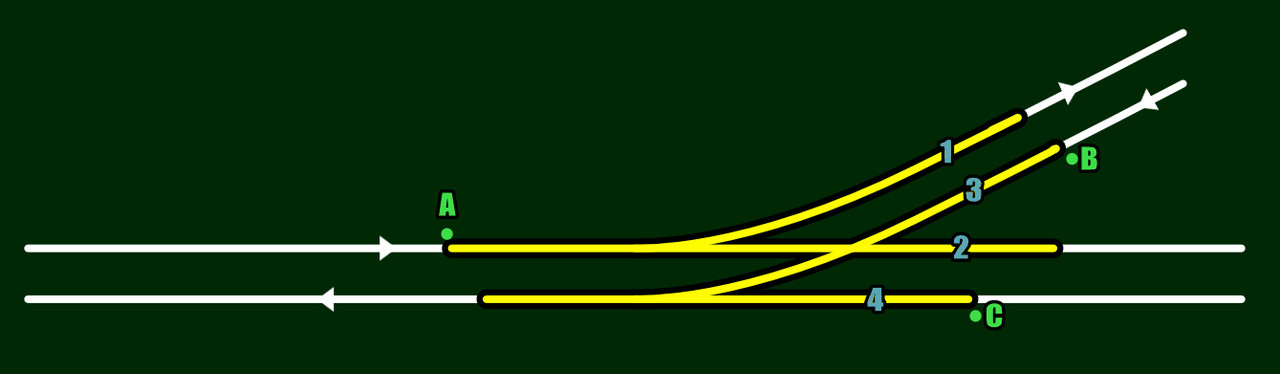
Here's Llanwern West Junction (a proposed site for one of several brand new railway stations here in South Wales!), which is also part of my route, but there are a few places where I'll need the same layout:

Two freight lines both turning right into Llanwern back in the day.

So I did a little test of the same layout using EITs:
Interlocking.jpg


The white lines are the tracks, A,B and C are the signals, and the yellow lines are what the EIT shows as the paths.
The blue numbers are the order that I put them into the EIT.

Incidentally, the paths are terminated using backward-facing invisible signals, so they don't show up in Trainz on the distance map at the bottom of the screen when you're driving. Another good tip from Mr. French guy in the video.

Anyway, I placed a few trains, one at each signal, and let them go!
Either A and B go, passing through each other, or A and C go.

It was my understanding that if any of these paths were occupied, then none of the others would be allowed to go.

It could be something simple I've missed, or done wrong, but I'm stumped.
My other tests on my station entry junctions worked fine.

I'll attack it again tomorrow.

You'd think that with all these shenanigans I'd be getting fed up with Trainz.
Not a bit of it.
I've learned a lot about what the newer versions of Trainz can do, and I'm enjoying it.
As me if I feel the same way in a month's time! 🤪
 
I think I just had an epiphany!

Because I have a line crossing another line that are NOT connected to each other, I need to use the external object function to set the lights to red for the opposing line.
The EIT must be smart enough to know that it can let two trains into the area if they are just passing on parallel lines, but needs help being told that unconnected lines are crossing.

I've already turned off the PC that I run Trainz on, and can't be bothered to switch it back on as it's late already, but I think I might be on to something.
 
I'll take a look at that video, thank you for that.

Good luck with your crossings. You may be on to something here. I tried a set up exactly like this on my Gloucester route and had a bugger of a time and gave up. It kind of worked but not well and definitely wasn't reliable. I ended up using a combination of visible signals, short stubs of invisible track connected to the lines with invisible junctions, and some invisible signals. The AI is forced to set the route causing opposing and crossing traffic to wait until the train pass through the junction. This works well about 90% of the time and I've always been looking for something else to work reliably.

Boat made some trigger assets that work similar to has ASB crossover controller. He has a demo route for those and I think they're available on the DLS now. I used them once on a route after I purchased them from him ages ago and I may go back and try those again. They use the usual driver command and triggers to operate.
 
Success!

It does seem that with normal junction work, the EIT will take care of the junctions and the lights, but when you have tracks that are not connected in any way, just crossing over, Trainz/EIT has no way of knowing that they're crossing, so setting the signal yourself using the external object feature.
Makes perfect sense.

I was so pleased when it worked, I recorded it! 😁

Now I can finally get back to laying track, building and planning things out.
 
Well, before getting with track-laying etc., I wanted to see if I could get diamond crossings working with EITs.
I set it up, and threw 3 trains at it, and it sorted them out no problem.
I ran it several more times, and it worked, then the last time, it didn't.

They all sat there forever.
I used a similar technique as the double junction, setting signals to "stop" for paths that needed it.

Then, when that stopped working, I took them out and used exclusive sets to forbid a train from using the diagonal if another train was using it.
Again, that worked a few times, then stopped working.

I'm coming to the conclusion that EITs aren't 100% reliable.
This could be down to the built-in AI, or the EITs themselves, or how I'm setting them up.

On that last point, the amount of information on them out there on websites and YouTube is shockingly low.
I know that the basic info is out there, but very little detailed information about setting up certain situations, or the nuances of getting them to work well.
If I still had my old YouTube channel and I got EITs working with all the knowledge required to do so, I would make videos on EITs, going into detail about how they work, and when and why they don't etc.
No-one seems to have done that (I know there are a few that go over the basics, and they've helped).

Have you seen the one by N3V? 😁
Not the most professional video I've ever seen, with low res video, poor presentation, and made soooo long ago.
I think the french guy's video I posted above is by far the most informative, and he goes through several drives to demonstrate things working for manual driving among the AI drivers (he has a couple of other videos on his channel besides the one I posted).

My aim for my route is for the AI to be able to go about their business mostly without problems, and for me to drive among them doing passenger or freight runs when I want to.
Mr French guy demonstrated just such a thing, but he tended to keep his route simple where junctions were concerned, and as he said, when he gets directed to a yard by the EITs selection panel, once in the yard he flips all the switches himself, which is exactly what I would do.

Unless I find information on EITs that convince me that they are 100% reliable in complex junction areas, I think I'm going to have to simplify my route, using EITs only in situations they can manage, and at least then I should be able to run a lot of trains without too many problems, and jump in and drive, allowing the EITs to get me to where I want to go.

What I don't want to do it lay a lot of track in these early stages, only to have to go back and simplify it.

Google AI has been more of a help with EITs than anything from N3V or most YouTube videos! (as I said, there a few decent videos on EIT, although it's all basic stuff).

Oh, there was one thing I wanted to ask.
John, on my search for information of any kind on EITs, I found a thread here where someone else was having problems with EITs (or maybe ITs, can't remember), and in that thread you said that Tony had said the whole underlying AI code needed redoing at some point.
That thread was from 2022 I believe, so I was wondering if anything has materialized from his statement in TrainzPlus.
Just curious.

Anyway, diamond crossings and double crossing galore, mixing freight and passenger lines for added fun, all run by the EITs, or simplify everything as much as I can, and just let the EITs control basic junctions.
Hmm. :unsure:
 
Nothing has really changed with the AI except for the new requirements for the Trainz Living Railroad which is built into all TRS22 versions. TRS19 remains pretty much the same as before. You may want to check the DLS. There was a recent update to the Navigate to and Drive to commands by "Auran", aka N3V. I don't know what they fixed because I haven't had a chance to do much driving.

I recommend starting a new thread help thread on EITs. You may get more response out of that than I can provide. I know very little about them other than my frustrated attempts and testing from the early days before they were released.
 
Yeah, a thread about the EITs would be a good idea, but I think people would want to be asked a specific question rather than "where can I find ALL the knowledge?".
And the only question I really have, and one I've wondering about today, is whether EITs are reliable and working, and it's me that's not setting the up correctly, or whether they really can't do some things, and the things they can do sometimes don't work (like under specific circumstances where 2 or 3 trains are requesting a route from it).

My diamond crossing tests are the perfect example.
It seems like it should be able to handle that quite easily.
I find myself asking whether they need to be signalled a certain way, do I need to use the external objects feature to set the signals to "stop" or should I use exclusive sets, or both of those together! etc. etc. etc.

With such a potentially powerful asset, I'm really surprised that there isn't a lot more information out there on YouTube.

(Whispers) I'm beginning to think that no-one can get them to work 100% reliably!
 
Back
Top