Installation Tunnel Problems ???

martrain

New member
Hello,

I'm having a problem with the tunnel creation process.

Even after installation, a piece of the tile is embedded inside the tunnel.

I've tried everything to fix this.

I've changed the terrain design = No luck.

I've opened the terrain, installed the tunnel, and covered it = No luck.

I've moved the tunnel under the terrain = No luck.

I've modified the heights and requested terrain flexibility = No luck.

It's as if each concrete piece is retaining its original terrain and won't be modified. So, it ends up inside the tunnel.

When I raise the tunnel's elevation, the terrain remains embedded within it.

What am I doing wrong, or is there a problem with this asset?

I'm giving an example here of the \kuid2 506208 1326 1 YARNish Tunnel L4 DL
of Steadway!
Capture-d-ecran-2025-11-27-063920.png
 
Tried the asset in TRS19 build 100240
Placed a section, then brought it down 10meter
connected 2 part of matching road, used the smooth spline
here it works as expected.

what is your version of Trainz?

In general, the dighole that comes with many tunnels is based on the 10m grid
We have asked to make it more precise FI by using an alpha dighole texture
but the developers sofar ignore the dighole issues, 1 of Trainz weaknesses for many years now.
greetings GM
 
Indeed, the Trainz version seems to be the issue.

I have Trainz 22 with the integrated and working HD option.

I've noticed a fundamental difference with TRS19.

HD allows for many things, that's true. But it also causes some assets to behave strangely.
I've seen in other posts that some people are having problems with the small-scale cutting of HD baseboards.
It's quite possible that the Yarn Tunnel asset isn't compatible. In fact, its installation is still problematic, as it only connects to 5m cables. In that case, the tunnel is probably not responding well to HD.

I'm not yet familiar with the possibility of making corrections within the asset.

Thank you for taking the time to discuss this with me on my post.
 
When laying track, including tunnels, and bridges, you need to set the height otherwise they will float upward or downward when the terrain is adjusted and sometimes will appear filled in.

The built-in fixed tunnels will align on the grid. To allow for tunnels to be placed at any angle, you can create your own by using separate assets including separate dig-holes, tunnel wall splines, tracks/walls, and scenery-type tunnel entrances.

From what I've read, there are problems with HD terrain and tunnels. I don't know what N3V has said regarding that issue.
 
Last edited:
Hi, I read in another post that you can convert the terrain to 5m, 10m, or HD in either direction.

After reading member G.M.'s post, I tried their example of using a less thinned terrain. I chose 5m.

So I built my tunnel in the intended spot.

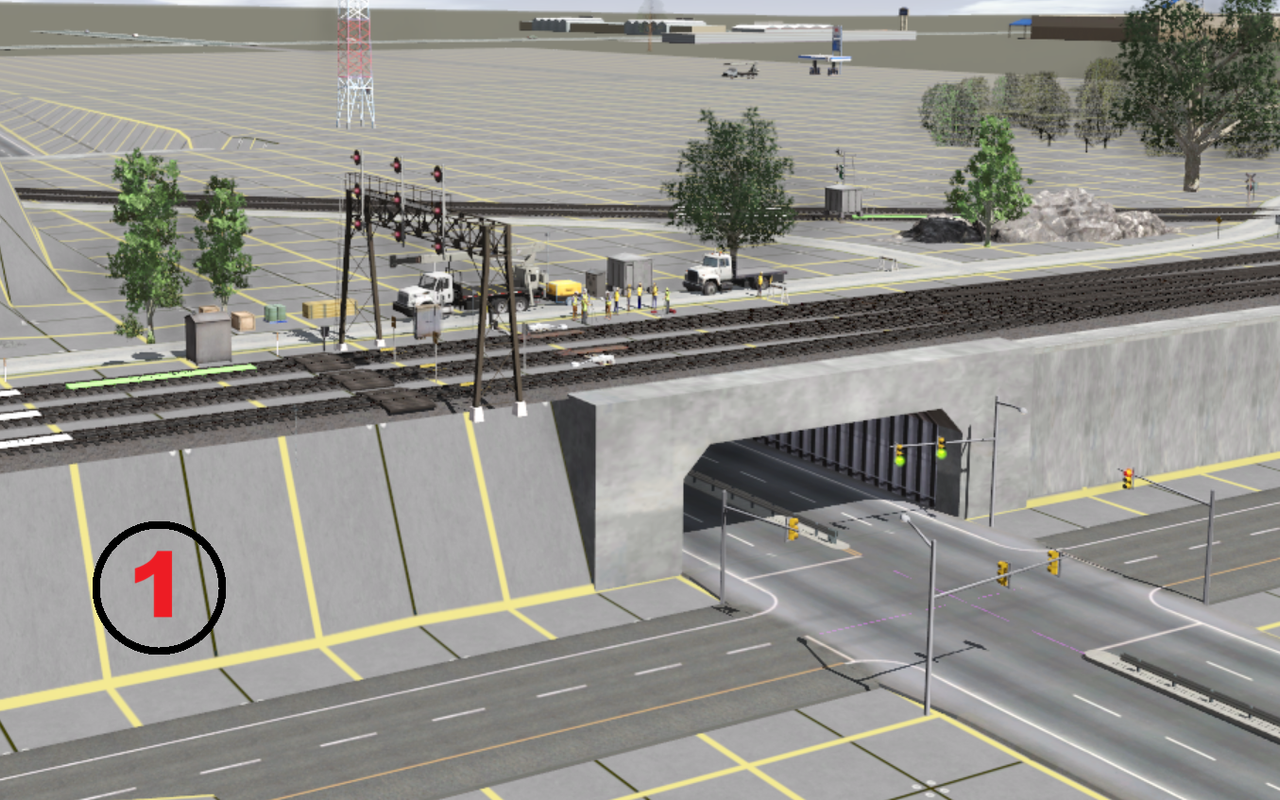
The result is perfect. Just like I did in TRS19.

(see photo-1)

But I have to switch back to HD because the rest of the scenery needs it.

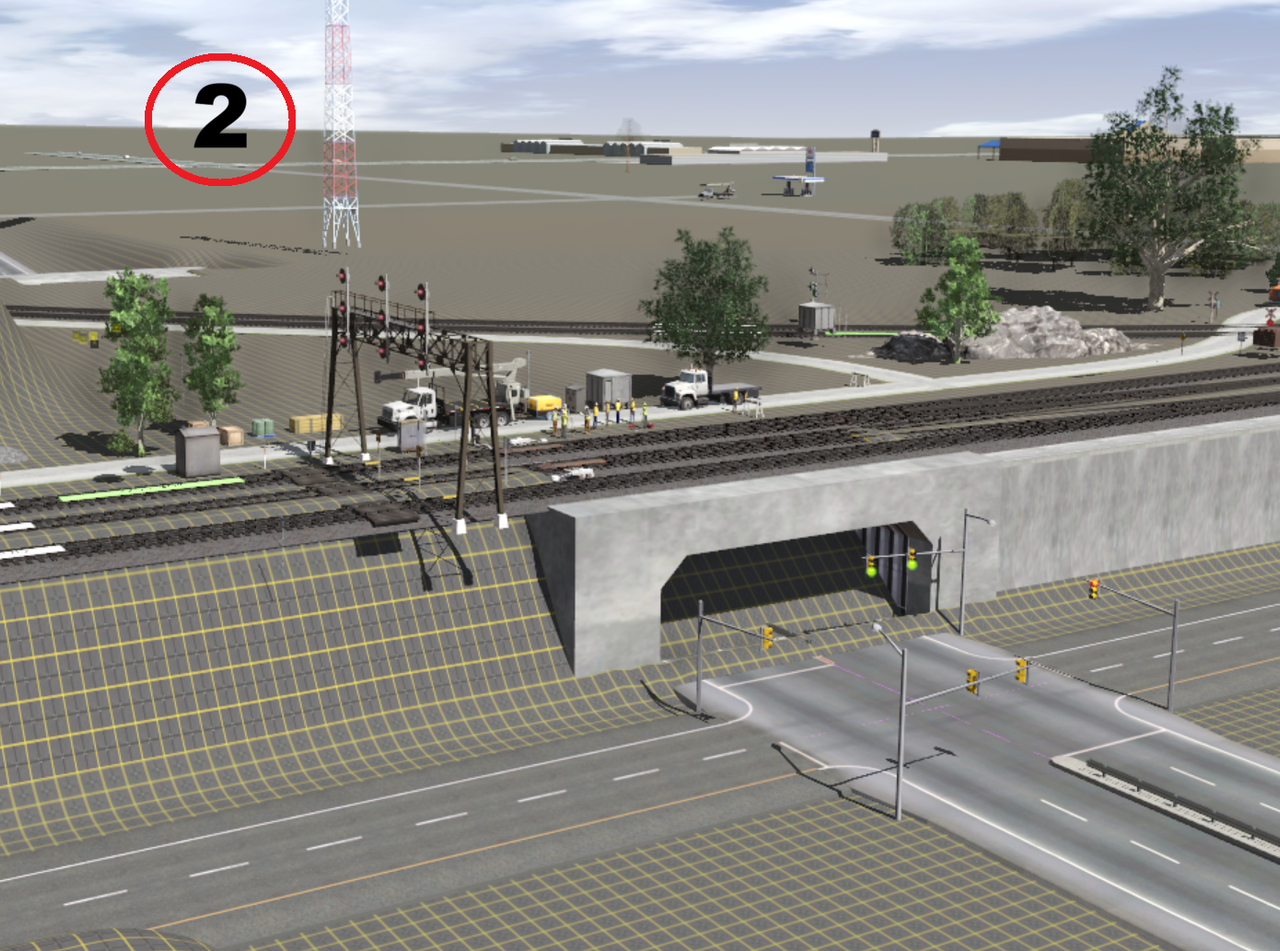
I flipped my baseboard to HD.

(see photo-2)

I didn't know this, but when you use this option, it's not just a small section (created with the "select part of the terrain" button), but the ENTIRE baseboard that gets converted.

So when I switched back to HD, BOOM, the problem came back.

Now, it's certain that the ASSET issue in HD is causing this unexpected problem.

As JCitron mentioned, these problems seem to be known but not yet fixed by N3V.
JCitron suggested I create the tunnel myself using separate parts. I'm undecided.

My design is already very detailed and will become even more so. Having even more graphical processing with my design could potentially cause a slowdown.

Which of the three options do you think I should choose?

1- JCitron's suggestion (personal creation).

2- Leave the problem as is for now and wait for a fix from N3V? (It's only an aesthetic issue at the moment).

3- Abandon the idea of the tunnel in this location.

Thank you for your help.

Martin

New layout / Proto-freelance.
Capture-d-ecran-2025-11-27-121313.png
Capture-d-ecran-2025-11-27-121358.png
 
Back
Top